
Standard Operating Procedure (SOP): Refund & Cancellation Scenarios -ConfirmTkt
1. Overview
This SOP provides detailed guidance on handling customer queries and support actions related to train booking cancellations, refunds, wallet adjustments, payment failures, and related issues for ConfirmTkt and ConfirmTkt platforms.
2. SOP by Case Type
Each scenario includes the common user query, internal steps, expected turnaround time (TAT), and resolution flow.
2.1 Waiting List Cancellation
User Query: "My waitlisted ticket got auto-cancelled. Where is my refund?"
· Steps:
1. Check PNR and charting status.
2. If auto-cancelled, verify refund initiation.
3. Track wallet/bank refund status.
· TAT: 5-7 working days
· Resolution: ConfirmTkt > Source account/wallet > User wallet or bank
2.2 User Cancellation Refund
User Query: "I cancelled the ticket myself. Where’s the refund?"
· Steps:
1. Confirm cancellation time and type.
2. Verify refund processed and transferred.
· TAT: 5-7 working days
· Resolution: IRCTC > IMM > Bank (if user opted)
2.3 Train Cancelled
User Query: "My train was cancelled. Do I get refund automatically?"
· Steps:
1. Confirm full train cancellation via NTES.
2. Validate auto-refund status.
· TAT: 5-7 working days
· Resolution: IRCTC system refund > Wallet or bank
2.4 Refund Pending
User Query: "I cancelled but refund hasn't arrived."
· Steps:
1. Confirm cancellation was processed.
2. Check if refund is within timeline.
3. Escalate if beyond TAT.
· TAT: 48–72 hours after refund TAT
· Resolution: Escalation to IRCTC/IMM
2.5 Refund Inquiry Before TAT
User Query: "I cancelled yesterday. When will I get the refund?"
· Steps:
1. Validate cancellation.
2. Inform user about the standard TAT.
· TAT: Informational
· Resolution: No action if within TAT
2.6 Refund Inquiry After TAT
User Query: "More than 7 days, still no refund."
· Steps:
1. Check refund processing in IRCTC/IMM.
2. Escalate if not processed.
· TAT: 24–48 hours post-escalation
· Resolution: Escalation to refund operations
2.7 Refund Failed
User Query: "I got a message that refund failed."
· Steps:
1. Retrieve refund UTR/Ref ID.
2. Ask user to check with bank.
3. Reinitiate or arrange offline refund.
· TAT: 48–72 hours
· Resolution: UTR verification > Manual refund
2.8 Partial Refund
User Query: "Only part of the amount was refunded."
· Steps:
1. Confirm IRCTC deduction rules.
2. Explain fare breakup to user.
· TAT: 24 hours
· Resolution: Fare rule explanation
2.9 Offline Refund
User Query: "Was promised offline refund but didn’t receive it."
· Steps:
1. Confirm refund approval.
2. Collect bank details if needed.
3. Follow-up with finance.
· TAT: 3–5 business days
· Resolution: Finance NEFT/manual transfer
2.10 IMM Wallet to Bank Refund
User Query: "How can I move money from wallet to bank?"
· Steps:
1. Guide user to use IMM withdrawal option.
2. Track transfer status.
· TAT: 2–3 working days
· Resolution: Wallet > Bank
2.11 IMM Refund Not Adjusted
User Query: "Wallet amount not used for my booking."
· Steps:
1. Check wallet balance at booking time.
2. Validate auto-apply conditions.
· TAT: 24 hours
· Resolution: Educate user or apply manually
2.12 IMM Refund Delay or Pending
User Query: "Refund not yet credited to wallet."
· Steps:
1. Confirm IRCTC refund.
2. Escalate IMM credit issue.
· TAT: 48 hours
· Resolution: IMM adjustment
2.13 IMM Immediate Transfer
User Query: "Can I get refund directly to bank?"
· Steps:
1. Explain refund first goes to wallet.
2. Guide wallet-to-bank transfer.
· TAT: Wallet 24h > Bank 2–3 days
· Resolution: IMM > Bank
2.14 IMM Discrepancy
User Query: "Refund in wallet is incorrect."
· Steps:
1. Audit IMM ledger.
2. Escalate for adjustment.
· TAT: 72 hours
· Resolution: Ledger correction
2.15 Delay in Initiating Refund
User Query: "Refund hasn’t been initiated yet."
· Steps:
1. Verify ticket status.
2. Manually trigger refund.
· TAT: 24 hours
· Resolution: Manual trigger
2.16 Booking Confirmed Using Delayed IMM
User Query: "I booked again before refund reached wallet."
· Steps:
1. Check IMM refund timestamp.
2. Explain mismatch.
· TAT: 24 hours
· Resolution: Education or goodwill credit
2.17 Bank Statement Dispute
User Query: "Money debited but not shown in statement."
· Steps:
1. Provide UTR/ARN.
2. Ask user to contact bank.
· TAT: 5–7 working days
· Resolution: UTR > Bank trace
2.18 Payment Failed (No Booking Created)
User Query: "Payment failed. Booking not created. Refund not received."
· Steps:
1. Confirm no booking created.
2. Share transaction ID.
3. Inform about auto-reversal.
· TAT: 5–7 working days
· Resolution: Payment gateway > Bank auto-refund
· An Overview of Refund Modes:
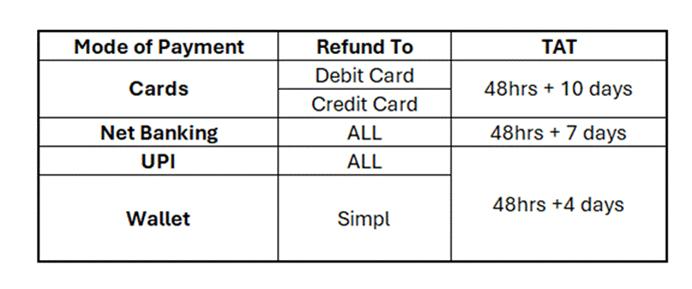
Refund TAT:
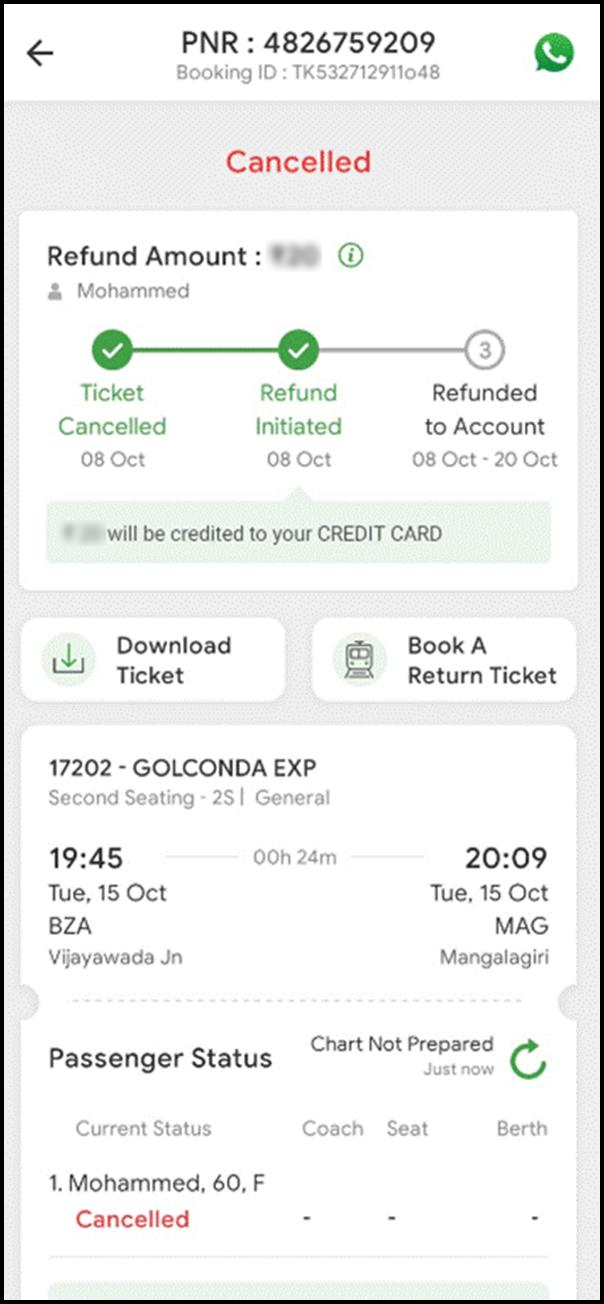
Different refund sources have varying Turnaround Time (TAT) protocols. The table below provides a complete overview of the TAT for each refund destination.
3. Frequently Asked Questions (FAQs)
Question - When a refund is pending and the Turnaround Time (TAT) has expired,? Answer If this is the customer's first contact, escalate the issue to the Supervisor and advise them to wait 24 hours for an update. If the customer has reached out before, check the communication section for any updates and share that information with them.
Question - The customer is inquiring about why the booking is failing, with the booking status showing as "Payment Initiated" or "Payment Failed," etc.? Answer - Apologise and inform the customer that the transaction that is initiated by your bank could have failed midway due to server or connectivity issues at either the payment gateway, merchant bank or service provider (IRCTC/ConfirmTkt ). Also educate them that ConfirmTkt has no control over such failures. However, we are always here to help you and connect with the relevant party to ensure that any amount, if deducted, is refunded to your source account.
Question - When the transfer from the ConfirmTkt Wallet Account to the bank is successful, but the customer claims they have not received it,? Answer- Inform the customer that the refund has already been processed on our end. If it hasn’t been credited to their account yet and it's still within the SLA, advise them to wait until the SLA is completed or an additional 7 days from the date the transfer was initiated, as banks can sometimes take longer to process refunds. If the case is outside the SLA, provide the available ARN to the customer and suggest they contact their bank's customer support to track the refund status.
Question - When the payment status is showing as "Dropped" on OneView,? Answer - We understand your concern, but it appears that your transaction was not completed because you dropped off during the payment process. If you continue to experience these issues, please let us know. You might also consider trying a different payment method for a smoother transaction. Don't hesitate to reach out to our Customer Service team again if you encounter any further problems.
Question - The customer is inquiring about a refund after the extended Turnaround Time (TAT) of 7 days has been breached.? Answer - Inform the customer that the refund has been successfully processed. Ask them to review their account statement carefully or contact their bank/wallet/UPI customer support with the RRN/ARN <XXXXXXXX> for verification. If the amount still does not appear in their account, kindly request an updated bank statement from the date of deduction so we can investigate the matter further.
Question - When the refund has not been successfully processed/Failed? Answer - Apologize to the customer for the inconvenience caused and inform them that, unfortunately, we were unable to process the refund of INR <amount> due to technical difficulties. Assure them that our team is actively working on the issue and that the refund will be credited within the next 7 days. If this is the customer's first inquiry, convey this message. For repeat inquiries, check previous communications before providing any updates.
Question - When the booking status shows "Payment Failed" or "Payment Pending" and the amount has not been received on our end, but the customer insists that the amount was deducted and is seeking a refund,? Answer - We will inform the customer that no amount has been captured on our end. If any amount was deducted, it will be automatically refunded to their source account within a maximum of 7 days. Share this information if the customer contacts us within 7 days of the transaction date. If the customer follows up after 7 days regarding the same issue, reiterate that no amount has been captured. However, if the customer continues to insist, request a bank statement for further investigation.
Question - The user is requesting that their refund be processed to a different account because their xxx account is closed.? Answer - In these cases, we will inform the user that we cannot transfer the amount to another account unless they provide proof of account closure. If they can provide this proof, it will help us expedite their request. Adviser will escalate the issue to Supervisor, who will then coordinate with the relevant authorities. However, it's important to note that the ability to change the refund method may depend on the original mode of payment. For example, it might be possible for debit card or net banking transactions, but it may not be feasible for Pay Later options. We will further investigate this matter to determine the possibility.
Question - What is the timeline for receiving a refund after canceling a ticket or filing a TDR by emailing etickets@irctc.co.in?? Answer - The time taken and the amount of the refund granted in such cases depend on the specifics of each situation, as determined by Indian Railways. ConfirmTkt and IRCTC will not be responsible for any delays on the Railway's end in these cases.
Question - The booking is PDTN. When can I expect the refund to be issued?? Answer - If the refund is intended for the ConfirmTkt Wallet Account, advise the customer to wait for 15 minutes. If it is meant to be credited to a source account other than the ConfirmTkt Wallet Account, inform them to wait for the specific time frame associated with their payment method.
11.How do I cancel a ticket on ConfirmTkt ?
· Go to Trips > Select ticket in upcoming > scroll down and Tap "Cancel"> select the passengers you want to cancel > click on “proceed”
12.Do I need to cancel a waitlisted ticket?
· If not confirmed, IRCTC auto-cancels after chart prep.
13.How long does refund take?
· Typically 5–7 working days.
14.Why did I receive a partial refund?
· IRCTC deducts cancellation charges as per their policy.
15.Can I get refund directly to my bank?
· Refund goes to wallet by default, you can transfer it to bank.
16.What is the wallet?
· It’s ConfirmTkt ’s wallet where payment refunds are credited first.
17.How to use wallet balance for new bookings?
· It’s auto-applied during payment if sufficient.
18.How do I transfer wallet balance to my bank?
· Use the "Transfer to Bank" option in the app wallet section.
19.What if my payment failed but money was deducted?
· Amount is auto-reversed by bank within 2–3 working days.
20.What is a UTR number?
· Unique Transaction Reference used to track refunds with the bank.
21.My refund failed. Will I lose money?
· No. It will be reprocessed or sent offline if needed.
22. Can I escalate refund delays?
· Yes. If refund isn’t received within 7 days, contact support for escalation.